Guide
How to turn meeting notes into action items with AI
Written for beginners. This guide does not invent statistics, and it is not legal, financial or purchasing advice.
Start with the handoff, not with a notes archive
The useful question is not only “Will this tool write notes?” It is “What happens to the work after the meeting ends?” Write down one recurring handoff you already have: action items into a task list, a follow-up email to a customer, or a CRM update for the next teammate. Then look at official tools that describe that step. This directory lists official meeting-capture and follow-up tools such as Otter, Granola, Fireflies, Fathom, Read.ai, Fellow, Avoma, MeetGeek and Notta. None of these listings is a hands-on test. Workplace workflow platforms already listed on the business-automation directory, and personal planners already listed on the life-admin directory, are kept off this site so the framing stays on the handoff.
A simple path: meeting, notes, tasks, next person
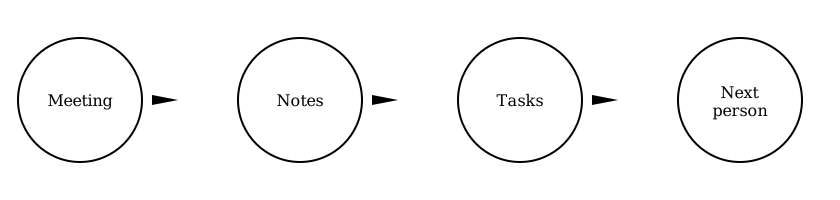
A simple loop is to capture the meeting, turn it into notes, extract the tasks, and pass them to the next person or the next app. Official tools describe different parts of that loop. Otter officially describes AI meeting workflows, follow-ups and CRM sync. Granola officially includes follow-up emails and Notion or CRM integrations on Business. Fireflies officially includes an action-items and task manager and an email assistant on Pro. Fathom officially generates action items on Premium and can officially update CRM fields on Business. Fellow officially includes AI action items and, on paid plans, project-management or CRM integrations. Read.ai officially includes action items in meeting reports. Avoma officially includes AI email follow-ups and auto-saving notes to CRM. MeetGeek officially describes automating follow-up work, including CRM sync and Zapier, Make or n8n. Notta officially describes follow-up emails and, on Business, CRM and Zapier integration.
Match the official plan to the step you need
Many official free plans capture or summarise a meeting but hold back the handoff features. In this check, official Fireflies action items start on Pro, official Fathom action items start on Premium, official Granola follow-up emails start on Business, official MeetGeek follow-up automation starts on Pro, and official Notta CRM integration starts on Business. Official Fellow and Read.ai free plans do include action items, but with tight official caps (a lifetime note limit on Fellow Free, and 5 meetings a month on Read.ai Free). Read the official plan tables, not a generic “it has AI notes” claim, before you assume the work will reach the next person.
Read official prices, trials and promos on the vendor’s own page
Every listing in this directory includes official prices as they appeared on 18 November 2026, or clearly says when a figure could not be confirmed. Some official pages show yearly-save toggles, two-user minimums, recorder-seat versus viewer seats, or time-limited promotions — for example official short-term discounts on some Otter or MeetGeek plans. This guide treats those as wording that was visible in this check, not as a promise that the offer is still current. Confirm currency, tax and regional hosting (some official pages mention EU storage or GDPR wording) at official checkout, especially for readers in Germany or the EU.
Watch the first week of handoffs
After you try an official free plan or trial, give the first week a simple human check: did the action items, follow-up email or CRM update actually reach the next person? Then look again at official usage limits — transcription minutes, meeting caps, seat minimums and integration asterisks. This directory’s listings are a starting map, not a substitute for the vendor’s live pricing page or for your own experience. Listings here have not yet been hands-on tested and have not yet had a human editorial review by the site operator.
Related: Meeting notes to tasks · Meeting follow-up tools · Granola vs Otter · Fireflies vs Fathom · Otter.ai alternatives · How we review